 Take the FIRST Tech Challenge!
Middle School FIRST Tech Challenge teams are part of a rich culture comprised of young innovators, guided by coaches and mentors, who tackle real-world challenges with ingenuity, integrity, and a sense of fun. Resources are available to get your team rolling towards an amazing FIRST Tech Challenge experience. We’re excited to have your team on board!
GETTING STARTED
- Provides a cohesive and comprehensive progression of STEM programs that engage students from pre-school through high school.
- Forges the connection between classroom lessons and real-world application.
- Experience STEM fields as future areas of study and career choices.
- Work side-by-side with mentors from a variety of backgrounds: education, industry, government.
- Get hands-on coding and rapid prototyping experience
- Apply the engineering process and learn to find the opportunity in failure.
- Gain access to FIRST dedicated college scholarships.
- Rise to the top in consideration for college admissions, internships, apprenticeships.
- Join over 600 Michigan middle school FIRST Tech Challenge teams in the premier STEM robotics program in the state!
FIRST HQ provides:
- Program information
- Program resources
- Team registration
- FTC Storefront
FIRST in Michigan provides:
- Access to FIRST programs in MI
- Michigan specific information and grants
- Local Events/Competitions
- Local resources to assist in every way.
A good rule of thumb is to follow the grade separation/distribution of your local public school district. For example, if 6th grade is a middle school grade or in a separate building from the elementary grades in your local district, then the appropriate FIRST program is FTC.
In FIRST, students can always play “up” a program level, just not “down” a program level. It is the decision of the coaches and parents/guardians on the fit of the program for a younger student.
Finding an existing team
FIRST in Michigan does not place students on teams and FIRST privacy policies prohibit us from sharing coach contact information. Our role is to assist new teams in forming by connecting them to local resources to help them be successful and sustainable. Majority of the teams in Michigan are organized through schools, so contact your student’s school to find out if a team exists and how to join. Some 4-H groups, Girl Scout groups, and other 501(c)(3) youth organizations also have teams.
If the team is full or if there is no existing team, we would be happy to assist you with starting a new team. We have grants for school affiliated teams that will cover the new team’s reusable robot kit and season registration fee!
Is there a list of Michigan teams?
Visit the MI FTC TEAM LIST to locate area teams.
For a list of historical teams across seasons, 2011-present, visit the MI FTC Archived Team Lists.
How to start a new team.
If a team does not yet exist at your school or in your area, or if additional teams are needed, use the information under “Register a Team” to get a team started.
Multiple teams out of a given school/organization are welcome and can be eligible for all grants. Visit the GRANTS page for details. As FTC team numbers and kit of parts are reusable year to year, previously existing teams from a given school/organization must be registered for the current season before newly forming teams from that same school/organization can be considered for rookie grant funding.
For the MI Dept. of Education (MDE) 99h State Grant, teams must be affiliated with an MDE recognized public or non-public school, charter, academy, or ISD.
Get a visual on the program by checking out FIRST in Michigan FTC event photos and match play footage. A big thank you to Dan Ernst, a volunteer FIRST in Michigan photographer, for sharing his time, talent, and Flikr albums with our teams!
- 2023-24 FTC States-NW photos
- 2023-24 FTC States-SE photos
- 2023-24 Detroit FTC Qualifier Recap (courtesy of FRC 5577)
REGISTER YOUR TEAM
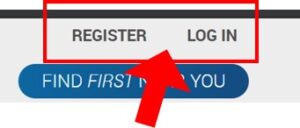
- Register a new FIRST Account – This is a “one time” activity for a new user: https://my.firstinspires.org/AccountManager/Account/Register.
- Log in to an existing FIRST Account – If the user already has a FIRST account, team registration and administration is done by clicking on “My Dashboard”.
Returning Teams (veterans) – Returning teams register with their existing team number. Check the MI Archive FTC Team List (tab 1 & 2) for a list of historical team numbers.
- Veteran Team Registration Guide – contains screenshots of the process.
- Take care of “Outstanding Tasks” on your Dashboard
- Update the Team Profile, update team contacts as needed, Lead Coach/Mentor 1 and 2 must electronically sign the season’s FIRST Consent/Release form and check that their FIRST Youth Protection Screening is up to date.
- Instruct any departing team contacts (Team Admin, Lead Coach/Mentor 1 and 2) to invite their replacements.
- Dormant Teams: If you were the Team Administrator and/or Lead Coach/Mentor 1 of a team that has been dormant and you don’t see your team on your FIRST Account Dashboard anymore, email firsttechchallenge@firstinspires.org and ask them to reactivate your team. Copy me at tammy@firstinmichigan.org. Include your team number in the subject line of the email.
- If a dormant team’s past Team Administrator and Lead Coach/Mentor 1 are no longer with the organization and you would like the team to be reactivated, email me at tammy@firstinmichigan.org and I can assist.
New Teams (rookies) – Newly forming teams (rookies) affiliated with a MDE recognized school are able to maximize the use of available grants to 100% cover the team’s basic start-up costs:
- FIRST HQ season registration fee
- Reusable robot kit of parts (Driver Kit, REV Control Hub, Robot build kit)
- Partial set of the season’s game elements, where this is the first team at a school new to middle school FTC.
Visit the START A TEAM WITH GRANTS site page for the steps to get your new team rolling with grants!
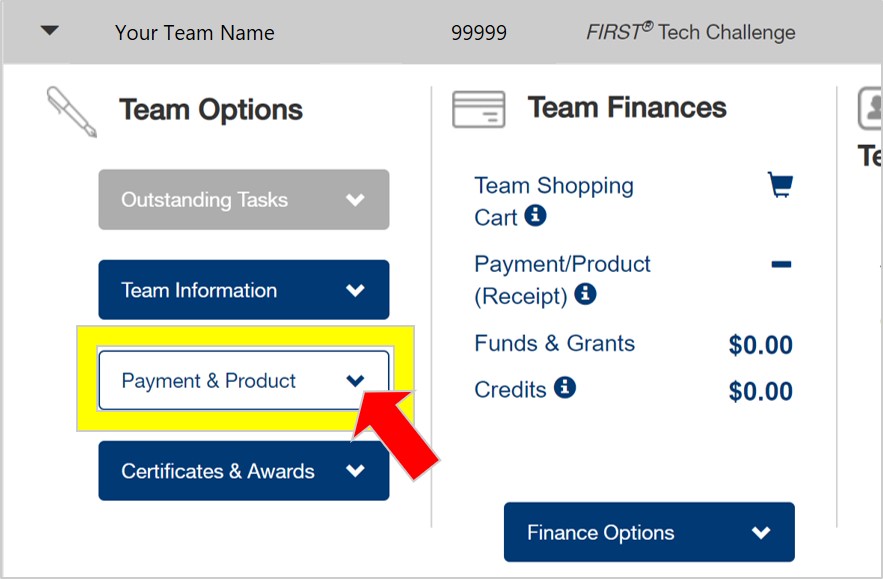
- Reminder: DO NOT PAY for anything through the FTC Storefront until HQ grant award decision(s) have been received.
- Grant awards administered by FIRST HQ are placed in the team’s FTC Storefront and can only be used to purchase the limited items offered through the FTC Storefront. FIRST HQ does not regrant funds to lower program teams, just high school FRC.
- All veterans out of the same school who were past grant recipients must be registered for the current season before a newly forming team can be eligible for the FIRST HQ and/or FiM FTC Rookie Team Grant.
Visit the GRANTS site page for available grants. Check back for updates and stay tuned for grant opportunities shared via FiM FTC Team Eblasts.
Teams should carefully review grant eligibility requirements and application procedures. Participation in a sanctioned FIRST in Michigan FTC event is a requirement of all grants.
- The FTC Robot Kit of Parts is reusable year to year.
- Team may but do not have to order game set components. Components are also available for purchase through AndyMark (recommended), as shipping is less expensive.
- Veterans may but do not have to order robot parts as they are reusable season to season.
- FTC Storefront product purchases can be made at any point in the season but are limited to once per season per product category.
- The FTC Storefront opens in a separate tab, pop-ups must be enabled in order for this to occur.
Team Registration Fee: FIRST HQ assesses an annual non-refundable team season registration fee. This fee is payable via the FIRST FTC Storefront.
FTC KIT OF PARTS (reusable year to year): Kit of Parts: For newly forming teams, the team’s season registration fee and initial kit of parts cost can be covered by the combination of the FIRST HQ and FIRST in Michigan FTC Rookie Team Grants. Rookie teams should order: Link to FTC Kit of Parts overview When selecting a build platform, take into consideration what build platform the teams around you are using (think robot triage). If there is no preference, most of our FiM FTC rookie teams use the REV Robotics build kit. If the team prefers an alternative FTC-sanctioned Robot Build kit to the REV Build Kit: Teams affiliated with sales tax exempt entities will need to upload their sales tax exemption certificate via a modal in their FIRST Team dashboard PRIOR TO purchasing products. Per FIRST HQ, there will not be refunds issued for incurred sales tax. The Sales Tax Exemption form MUST contain the following information or it will not be accepted: Dashboard screenshots of the sales tax exemption form upload process can be found on the Sept. 21, 2020 FTC Blog. The easiest access point is to go through the “Team Finances” section (2nd section) on the Team Dashboard and select “Sales Tax Exemption Information” from the “Finance Options” dropdown. It can take up to 5 business days for the form to be processed but usually occurs more quickly. Questions should be directed to salestax@firstinspires.org.
The base FTC Kit of Parts (KoP) is purchased through an online store operated by FIRST HQ called the FTC Storefront.
ORGANIZE YOUR TEAM
What is the allowable team size?
FTC teams vary in size. Most of our FiM FTC teams are between 8-10 team members. The small-team concept works well with the platform and encourages a closely knit team where all are engaged. Multiple teams per school/organization are welcome!
FiM FTC will provide a maximum of 15 of the season’s game pins to teams distributed at the first full scale event where the team competes. Additionally, Qualifiers/League Tournaments/State Championship events that distribute team medals (optional at the Qualifier/Tournament level) will distribute a maximum of 15 per awarded team. These maximums will prioritize student team members. Additional pins/medals may not be available.
Can 6th grade middle school students be on a team?
Yes! In FIRST, students can play “up” a program level”, just not “down”. It is the decision of the coaches and parents/guardians on the fit of the program for a younger student. It’s often best for younger students to be part of a multi-grade team. Younger students benefit from the experience and knowledge of the older students giving older students the opportunity to emerge as leaders and develop mentorship skills.
What are some ways to encourage students to join the team?
- Arrange to have a table at your school’s start-of-year open house or “meet and greet”.
- Create a pitch to be included in school eblasts, facebook, school announcements.
- Connect with teachers of STEM disciplines at your school and ask them to share about the team and program.
- Host a local Townhall Meeting. This is a fabulous way to draw in a lot of families. FRC 503 in Novi has created open source resources to host a successful town hall meeting: https://frogforce503.org/page-townhall.html. Scroll down for downloadable documents.
- For newly forming teams, arrange for an area veteran team to bring their robot and speak to the program.
- Reach out to your local Community Education, Parks and Recreation, libraries, and other entities that have youth programs about your team.
KEY: For onsite events, have a FTC robot as an exhibit. Many people are unfamiliar with FIRST and being on a robotics team can sound intimidating. If possible, allow interested students to drive the robot. Be sure to have a way to capture parent contact info in order to follow up post event with team info. If your team does not have a FTC robot, reach out to tammy@firstinmichigan.org to connect you with a near-area team.
FIRST HQ requires all youth team members to register in order to participate in team meetings, events, or competitions.
Instructions for both parents and coaches regarding registering youth team members can be found on the FIRST Youth Team Registration System Overview page on the FIRST HQ website. Mobile device instructions are available: https://www.firstinspires.org/sites/default/files/uploads/resource_library/youth-registration-guide-mobile.pdf.
Overview of the process: The parent has to create/login to their FIRST Account then there are two ways to add the student to the team. It is recommended that the coach chooses one approach to avoid confusion.
1) Parent applies to the team on behalf of their student
2) Coach invites the parent to register their student
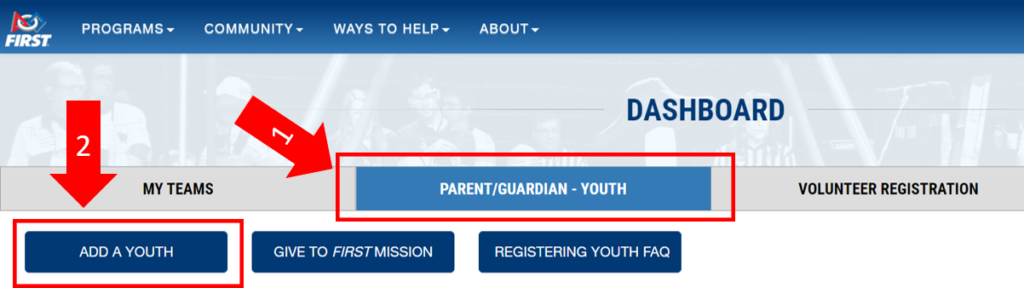
The youth registration process includes the parent signing an online FIRST HQ Consent and Release form on behalf of the student (<18 years of age). Once this is completed, the Coach can electronically accept the student onto the team. This process enables the coach to create an electronic Team Roster which is turned in when the team checks in at an event.
In cases where a student is unable to register electronically due to a lack of internet access or an undue burden, FIRST will not require registration in the Youth Registration System and the youth may submit a paper copy Consent and Release Form. The parent should contact the Lead Coach/Mentor of their child’s team to request a paper copy of the FIRST Consent and Release Form. The Lead Coach/Mentor should then contact FIRST in Michigan FTC at tammy@firstinmichigan.org, who will review the request and provide additional direction. Coaches will need to collect and mail (First Class) original paper forms directly to FIRST in Michigan prior to the student’s participation in an event.
Inviting additional coaches/mentors to your team.
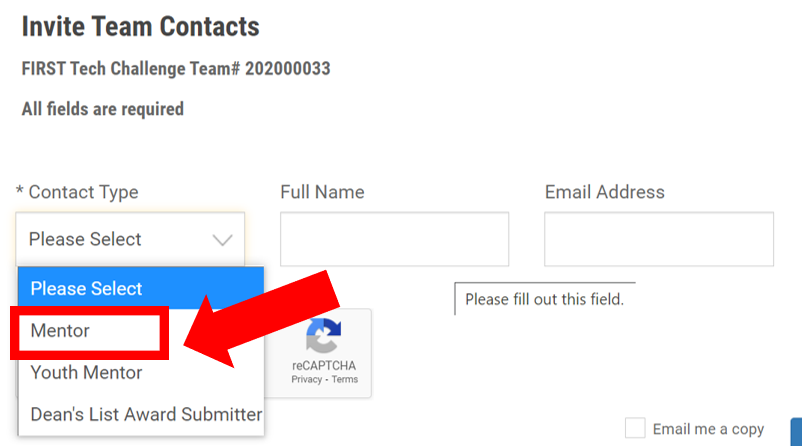
The Team Administrator and/or Lead Coach 1 for the team can invite others to fill roles such as Lead Coach 2, Mentor, Youth Mentor. This is done through the “Team Contacts/Roster” section of the Dashboard under “Other Contacts”. Note that the Lead Coach 1 role for the team must not have any outstanding tasks (C/R form and YPP screening) in order for this area to be available for invitations.
- Log in to the Dashboard via www.firstinspires.org.
- Under “Team Contacts/Roster” click the “Invite Contacts” hyperlink:
- On the Team Contacts page, click the “Invite Contacts” box
- Click “Contact Type” to select “Mentor”, then enter the contact’ name and email address:
Is one coach/mentor enough?
Every team is required to have two registered adult coaches who have completed the FIRST Youth Protection screening process. Any adult can be a coach – teacher, parent, industry professional, college student. Training sessions, workshops, and a supportive FIRST community are available to help get new coaches/mentors up to speed. The scope of the roles is at the discretion of the coaches.
What is the role of a mentor?
Mentors provide assistance to teams, at one or more meetings, in their particular area of expertise. They provide valuable one-on-one interaction and serve as a resource in their specialty. Mentors with skills in these areas are helpful, but not mandatory: engineering, coding, tool skills, electrical, manufacturing, CAD, business, marketing, communications, and administration.
Where can we find mentors?
- Approach area businesses for in kind donations in the form of mentorship.
- Parents of team members can take on a mentorship role in support of the team.
- Ask teachers in your school or district.
- Reach out to local professional organizations.
- Connect to your local FRC team for student mentors. Many of our FiM FRC team members have done FTC in middle school. Great leadership opportunity for the FRC team members!
- Reach out other local FIRST teams; their experience and knowledge base can be a tremendous resource.
Do coaches/mentors need to have a technical background?
A technical background is helpful, but not necessary. Mentors can be brought in to help with the technical aspects of the team. Coaches must be willing to acquire some basic knowledge of coding and robot building. The FIRST Tech Challenge Mentor Manual, available on the FIRST HQ site, is a great resource which provides a foundation of knowledge and ideas designed to assist mentors in all aspects of the program.
In FTC, mentors are a part of the team. Mentors share their expertise to fill knowledge gaps, teach skills, and provide support in technical areas like robot design, wiring, build, and coding, as well as non-technical areas such as fundraising, marketing, and project management. The mentor’s role is to foster student learning and ownership, assisting students in making key decisions and completing tasks.
For the younger FIRST programs, mentor participation is more restricted as the robot build platform and “tools” to achieve the program’s objectives are considered age-appropriate for the age range of students on the team. Middle school FTC team members often don’t have the knowledge/skills/experience to achieve all aspects of the program’s objectives. Mentors help bridge this gap to prepare students to tackle more complex tasks. In FTC, students should do the bulk of the work with mentors serving as guides and facilitators, filling in the gaps where needed, but mentors should not be the primary or sole laborers.
In Michigan, middle school FTC is positioned as a stepping stone program giving students the requisite skills, experiences, and confidence so that they can “hit the ground running” when they get to high school FRC.
Where do teams meet?
Teams can meet anywhere that is appropriate and safe such as a school, homes of team members, meeting hall, or a sponsor provided location. It is important to set a regular schedule and procedure for team meetings. Things to look for in a meeting site:
- Safe work space large enough for the team members and their equipment
- Safe area for tool usage
- Flexible meeting hours
- Internet Access
- Secure place to store equipment
- Work tables and chairs
- Share host duties, if possible
What is the time commitment?
Teams will need to arrive at their own optimum time commitment, but generally, teams meet 2 to 3 times per week for 2-3 hours per session. Additional meetings are usually planned as competition time approaches. Many mentors report that the “push” to meet more comes from the team members!
What is a typical team budget?
| Base Costs | ||
| FIRST HQ Registration Fee | $325 | Required for all teams each year |
| Robot Kit of Parts | $1,260 + $40 s/h | Required for all teams their rookie year |
| Game Elements – partial | $250+ $60 s/h | New game each season |
| Event Fee | $100 | Paid directly at competition |
| Additional Items: | ||
| Tools | $100 | See “Tools and Other Useful Items” |
| Extra Parts and Materials | $150 | Materials, spare parts, etc. |
| Team spirit items | $150 | T-shirts, pit swag, etc. |
| SoftTile Mats (27 is partial field) | $8.75 ea | Same friction as competition field. |
| AndyMark Official Perimeter | $709 + $90 s/h | DIY version on HQ site |
FIRST HQ FTC Cost and Registration site page: https://www.firstinspires.org/programs/cost-and-registration#ftc.
Sample team budget worksheet for both rookie (tab 1) and veteran (tab 2) teams: Team Budget Worksheet.
What part of the costs do the rookie team grants cover?
The combination of FIRST HQ and FIRST in Michigan Rookie Team Grants covers a team’s initial start up costs, purchased through the FTC Storefront, which includes the annual team registration fee and kit of parts purchase. A team must be affiliated with a school or established 501c3 organization to be eligible for the FIRST in Michigan FTC Rookie Team Grant.
How do teams find funding?
Teams are encouraged to take responsibility for their budget. Many teams engage in fundraisers and reach out to area businesses for sponsorship in order to sustain the team.
Have the parents of team members check with their employers as many companies offer grant funds for youth STEM programs where employees are actively involved.
Sponsorship isn’t limited to financial contributions. It can also include mentorship and in kind donations of equipment or work space. This connection between the team and the community is a unique aspect to FIRST.
Visit the FIRST HQ and FIRST in Michigan Grants pages from time to time for grant opportunities.
- FIRST HQ grants: https://www.firstinspires.org/robotics/team-grants
- FIRST in Michigan Grants: https://firstinmichigan.us/FTC/grants/
Recognize team sponsors by including their company name and logo on the robot, pit area, team shirt, social media, etc. Sponsors often visit and volunteer at events; take the opportunity to meet them and say thank you! Downloadable FIRST in Michigan Sponsor Logos are available on the RESOURCES site page.
What is the FIRST in Michigan FIRST Tech Challenge season timeline? See the EVENTS page of the FIRST in Michigan FTC website for the season timeline.
| May | Registration Opens |
| September | Season Kickoff & Game Reveal |
| Sept.-early Nov. | Build and Practice (no bag day!) |
| early October | Sign up for an official event |
| Nov.-mid Dec. | Competition season |
| December | Michigan FIRST Tech Challenge State Championship events* |
| April | FIRST Championship |
*State Championship and FIRST Championship are advancement based. Separate event fees will apply.
What is the yearly game challenge?
The challenge is the annual game that FIRST HQ reveals to the teams each Sept. at kickoff. Teams determine their strategy then design, build, program, and test their robot to meet the challenge. Working through the engineering process brings the reality of science and technology to students on a more hands-on level while instilling teamwork values.
Teams can access game rules and specifics at https://www.firstinspires.org/robotics/ftc/game-and-season. Knowledge is power!
Do teams need a playing field and game sets?
A FIRST Tech Challenge “playing field” is comprised of three parts: a 12’X12′ perimeter, 36 Soft Tile mats, and a “game set”. The perimeter and mats stay the same year to year. The game set changes to reflect the season’s theme. The official FIRST Tech Challenge playing field is available from AndyMark, a FIRST certified vendor. A partial set (red or blue) suffices for team practice purposes.
Most teams procure a few Soft Tile field mats and a partial set of game elements for testing purposes. FIRST HQ has plans for constructing a low cost perimeter. Local sites with fully outfitted playing fields often host open practice times for area teams. These “open site” opportunities will be eblasted to teams and posted on the Team Eblast blog linked to the RESOURCES site page.
Can we use parts outside the standard FIRST Tech Challenge Kit of Parts?
Yes, but always check the rules! Allowable parts and season-specific equipment information can be found in the annual Compeition Manual. See the RESOURCES page for a list of commonly used parts vendors.
Can we use a 3D printer to make parts for our robot?
Yes, FTC teams can 3D print parts for the robot. Teams frequently use 3D printing to create custom parts for their robots, including gears, wheels, mounts, and other specialized components. 3D printing offers a way to rapidly prototype and iterate on designs, produce lightweight and unique parts not available commercially, and make manufacturing accessible for teams that lack traditional tools. Plus, it’s fun!
What kind of tools are needed:
Recommended but not limited to:
- Allen Wrench, 7/64″ & 1/8″
- Wrench (open end / box end), 5/16″ & 1/4″; Hacksaw,
- 32 tooth blade; Hand Files (flat and round); Wire Strippers;
- Wire Cutters; Needle Nosed Pliers, Powerpole crimper. tape measurer.
Expanded Tool/Useful Item list (useful when seeking in-kind donations):
- Hex Keys/Allen Wrenches: A good set of metric hex keys (2.5mm, 3mm are key for GoBilda and REV parts). T-handle hex drivers are recommended for ease of use. You will get a set of hex keys with the robot build kit, but they aren’t nearly enough and the quality isn’t that great.
- Screwdrivers: A set of Phillips head and flathead screwdrivers, with smaller sizes for electronics and other tasks.
- Wrenches: Combination wrenches (open and box end) are useful, with 7mm often needed for GoBilda. Consider ratcheting wrenches for efficiency.
- Pliers: Assorted pliers like needle-nose, diagonal cutters, and slip-joint pliers.
- Vice Grips: Essential for holding parts securely.
- Files: Metal files for deburring and shaping parts.
- Hammers: A ball-peen hammer for striking metal parts and a rubber mallet for gentle adjustments.
- Tape Measure: For basic measurements.
- Calipers: Useful for precise measurements, especially if you’re making your own parts or need to measure critical dimensions.
- Drill: A cordless drill is recommended for drilling holes and driving screws.
- Drill Bits: A set of metric drill bits, including sizes for tapping and clearance holes.
- Nice to have:
- Jigsaw: Useful for cutting polycarbonate and other sheet materials.
- 3D Printer: While not essential, a 3D printer can be a valuable tool for prototyping and creating custom parts.
- Dremel: A rotary tool like a Dremel with cutting and sanding attachments can be very versatile.
- Soldering Iron: Useful for electronics work and inserting/removing heat-set inserts for 3D printed parts.
- Multimeter: For diagnosing electrical issues and checking battery voltage.
- Wire Strippers/Cutters: Essential for preparing electrical wires.
- Crimping Tool: For attaching connectors to wires.
- Electrical Tape: For insulating and securing wires.
- Teams often make a DIY perimeter or partial perimeter to simulate the playing environment for testing purposes. Low-Cost Field Perimeter Build Guide
- Many teams get some of the SoftTile mats (AndyMark), as that is the surface the robot drives on in competition. The AndyMark ones are more expensive as they are thicker (what we use in competition). But the similar kid play mats (soft side up) are just fine for testing.
- Safety Glasses: Absolutely essential for eye protection during all building and testing activities.
- Toolbox or Tool Bag: To keep your tools organized and easily accessible.
- Zip Ties: Very useful for cable management and securing parts.
- Totes to pack up and carry supplies.
- Loctite (Blue): To prevent screws from loosening due to vibration.
- Stripped Screw Remover: For dealing with stripped screws.
- Sharpies and other marking tools: For labeling and marking parts.
- Robot cart: Useful for moving the robot and small tools from pit to playing field.
- Robot sizing tool: Can buy from AndyMark or make one. FTC robots are limited to an 18-inch cube in their starting configuration. This means they must fit within an 18-inch by 18-inch by 18-inch cube before the match begins. After the match starts, robots can expand to any size.
WHAT’S NEXT
Are there team/robot resources available?
Yes! The FIRST HQ site has many helpful resources:
- Team Management Resources – many topics
- Robot Building Resources – many topics
- Technology and Coding Resources – many topics
- FIRST Tech Challenge Forum – program information on many topics
Where do we start? Where to find the Starter Bot guides: https://www.firstinspires.org/resource-library/ftc/robot-building-resources. How do the robots communicate? FTC uses Android devices to control its robots. During a competition, each team has two Android devices. One Android device is mounted onto the robot and is called the Robot Controller. In most cases, the ROBOT CONTROLLER is integrated into the REV Robotics Control Hub. The ROBOT CONTROLLER acts as the “brains” of the robot. Many Teams will also connect a REV Robotics Expansion Hub for additional ports to connect motors, servos, and sensors to the ROBOT. A second Android device sits with the team drivers and has one or two gamepads connected. This second device is known as the DRIVER STATION. The DRIVER STATION is like a remote control. The DRIVER STATION allows a team to communicate remotely (using a secure, wireless connection) to the Robot Controller and to issue commands to the Robot Controller. Most teams use a REV Robotics Driver Hub, but select Android smartphones are also supported. What coding language can be used? What coding resources are available? FIRST HQ Coding Resources: Visit the FTC coding resources developed by FTC alumni and current FRC team member, Nolan Kuza (FRC 33). The variety of resources can be used by both rookie and veteran teams, and all content is available in both Blocks and Java variants. FTC SIM https://ftcsim.org/ is an FTC-based coding simulator developed by FIRST Canada. It is free to teams, but an account must be created to gain access.
Get familiar with the platform by having your team build and program the Starter Bot. There are guides available for a variety of FTC legal robot platforms. Starter Bot is a small robot that consists of a simple chassis and arm. There is accompanying Blocks code that can be downloaded. Build Starter Bot and see what it can/can’t do as it plays the season’s game – then watch the innovation begin!
Android’s native coding environment is Java. Java is the primary language used in application development giving FIRST Tech Challenge team members 21st-century applicable skills. Teams can choose from several coding environments:
What is the purpose of the Team Portfolio?
A team portfolio is a short and concise summary of the team’s engineering journey throughout their season. The portfolio is like the team’s resume. One of the goals of FIRST and FIRST Tech Challenge is to recognize the engineering design process and the journey that a team makes. This journey encompasses the phases of the problem definition, concept design, system-level design, detailed design, test and verification, and production of the robot.
What do we put in our Team Portfolio?
The portfolio can include sketches, team meeting notes, design evolution, processes, successes and obstacles, team goals, and skills learned throughout the journey of the season.
What are the acceptable formats for the Team Portfolio?
Refer to the Competition Manual-Section 6.2 for Team Portfolio guidelines and limits. There is a page constraint!
IMPORTANT: Teams must bring a hard copy of their Portfolio to events. Electronic (flash drives, internet links) submissions will not be accepted at events.
Is a Team Portfolio required for awards?
A portfolio is required for some awards but is helpful for all awards. A good portfolio is also a great way to record your team’s season and share it with future team members or sponsors. See the Competition Manual, Section 6-Awards for the specific rules regarding awards and portfolio-specific requirements.
Is there a curriculum for FTC?
Yes! FIRST HQ has developed free curriculum which is available to all teams: FIRST Tech Challenge Curriculum. It can be used as a stand-alone course or as a supplement to areas where the team needs extra support. Other resources, like Camp Guides and STEM activities, are available as well.
- FIRST has a Robotics Engineering Exploration Curriculum
available for free: https://www. firstinspires.org/community/ free-education-resources. It will prompt for an online form to be filled out to gain access. - REV Robotics – REV kit based curriculum; free but you have to fill out a quick form
- AndyMark Robits based curriculum – alternative build platform designed for ease of use; free curriculum. Allison Kneisler with Avondale Robotics worked with AndyMark to design the kit and curriculum.
- FTC Classpack – There is an associated registration fee, robot kit bundle is available. FIRST recommends 3 students per kit.
- Key to note: FTC teams that operate in the classroom must participate in a sanctioned FiM FTC official event (i.e. Saturday, full day competition) to be eligible for rookie team grants and the 99h state grant.
- FIRST Certified Professional Development: In person and remote sessions are available. There is a fee to attend. During FIRST Tech Challenge professional development, you’ll learn how to engage students in grades 7-12 in the engineering design process and career-ready practices through team-driven robot building and programming.
- Standard Alignment Maps: FIRST has completed external analysis and mapping of FIRST Tech Challenge to state and national educational standards.
- Student Learning Progression: Validate or assess students’ knowledge and skills, and ensure students are acquiring knowledge and developing skills that are age- and grade-level appropriate.
- Scope & Sequence Options: Customize activities to extend beyond the 10 sessions using FIRST supporting materials.
Google “FTC Robot in 3 Days” to find YouTube’s from various sources of robots built in 3 days that play the season’s game!
Are there places we can go for help?
There are season kickoff events hosted around the state that coincide with the official FIRST Tech Challenge game announcement in early Sept. Many events include workshops, breakout sessions, and a reveal of the season’s game. Kickoff events provide a great chance to network with area teams for ongoing season support. See the EVENTS site page.
Gracious Professionalism and Coopertition are bedrock tenets of FIRST. Reach out to your local FIRST community; a valuable source for information and support. Need an introduction? Email tammy@firstinmichigan.org with your request and we’ll be happy to make the connection.
EVENTS
What does the competition structure look like in Michigan?
FIRST in Michigan has a hybrid competition structure with both qualifiers and regional leagues. Qualifiers and League Tournaments advance a set number of teams to one of the two FIRST in Michigan FTC State Championship events.
Will there be an event in my area this year?
There will be events across Michigan. Events are posted on the EVENTS site page and the FIRST HQ website.
How many events does a team participate in?
Each team must participate in at least one FIRST in Michigan FTC official event. Teams will have an opportunity to compete in more than one event. Possible event types:
- Qualifiers/League Tournaments: Official events that advance a set number of teams to the Michigan FIRST Tech Challenge State Championship. Participation in one is mandatory, 2nd qualifier is optional.
- League Meets: Official event. League teams compete in at least 3 league meets and one League Tournament.
- Michigan FIRST Tech Challenge State Championships: Official event. Advances a set number of teams to the FIRST Championship.
- FIRST Championship: FIRST’s flagship event.
- Spring Competitions: A chance for teams to play more! These follow a qualifier format but without an advancement component. Usually held in May.
- Off Season: Non-official events; smaller scale; variable format. Teams can play in as many as they want. Great way to experience the game, shake down the robot, and network with other teams. Scrimmages are usually run by teams.
Is there a cost to compete in an event?
For FIRST in Michigan, the event fee comprises the budget for the event. The event fee for Qualifiers and League Tournaments is $100 per event and is remitted to the event host usually at event check-in. Payment by cash or check is generally accepted. The Michigan FIRST Tech Challenge State Championship event fee is $200 and is remitted to FIRST in Michigan.
How does our team register for an event?
For FIRST Tech Challenge, event registration is done at the local level, and not with FIRST HQ. The EVENTS site page provides in depth information on the process.
Teams will see their confirmed event placement(s) in the MI FTC TEAM LIST, and not on their Team Dashboard.
Why are there Judged Awards at events?
Judged awards represent another positive way to recognize teams that embody important values like teamwork, creativity, innovation, and the value of the engineering design process. At competition, all teams rotate through one 10 minute judging interview session. These judging sessions enable students to practice and hone presentation and public speaking skills.
What do teams bring with them to Judging?
Teams should bring their robot (not powered) and their Team Portfolio. All team members are encouraged to be present for the judging interview session. Some teams also bring display boards depicting their engineering process, team outreach, other items/activities of note.
Can coaches/mentors attend and speak during the Judging session?
One coach/mentor may sit in on the team’s Judging session but they must stay in a designated area and may NOT speak during the Judging session. It will reflect negatively on a team if a coach/mentor does not abide by these guidelines.
Are any Judging resources available?
All Judging documents are open source in FTC: https://www.firstinspires.org/node/5146.
What are the FIRST Tech Challenge Awards?
Synopsis of FIRST Tech Challenge Awards. Dean’s List is not awarded at FIRST in Michigan FIRST Tech Challenge events as candidates must be high school students. Optional awards are at the discretion of the event host. The Competition Manual has a section dedicated to Judging and Award Criteria.
How do teams advance to States and the FIRST Championship?
Teams are eligible for advancement at any one of the first three official fall season events they participate at the following levels: Qualifying Event and League Tournament. Each event has a designated number of advancement spots to the Michigan FIRST Tech Challenge State Championship. From States, teams can earn one of the designated advancement spots to FIRST Championship.
FTC has moved to a points system for advancement. Teams will accrue advancement points throughout an event. At the end of the event, the top N teams according to advancement points will advance. Advancement points are gained over the course of a single event, so teams are only compared with other teams at their event when considering advancement.
See the Competition Manual, Section 4 for details of the process.